
Caribbean · +297
Aruba phone number format
- Country code +297
- No trunk prefix
Reviewed by Sujan ThapaliyaLast updated
What does a Aruba phone number look like?
+2975931234: the country code +297, and no spaces or punctuation.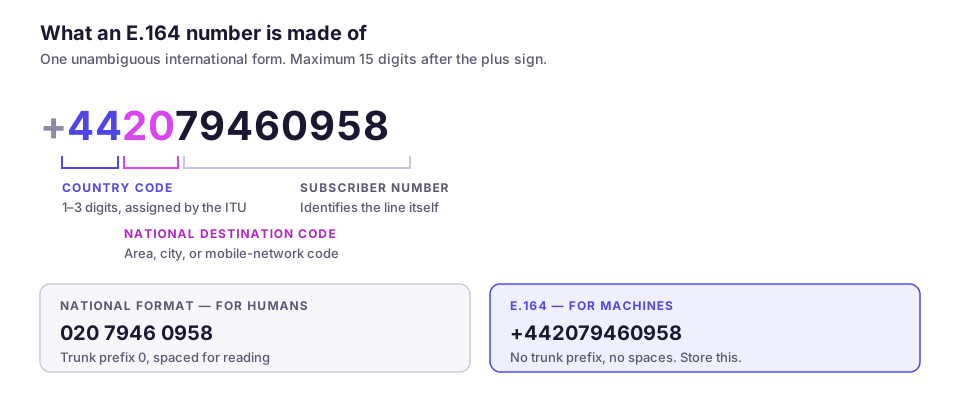
Format rules
- Country code
- +297
- National number length
- 7 digits, no area code
- Trunk prefix
- None
- The local number is already the international number.
- Landline pattern
+297 XXX XXXX- Mobile pattern
+297 XXX XXXX
Examples
Aruba phone number examples
These are format patterns showing digit grouping and prefix rules. They are examples of shape, not working numbers; do not use them to test a live call path.
| Type | Written domestically | International (E.164) |
|---|---|---|
| Landline | 582 1234 | +2975821234 |
| Mobile | XXX XXXX | +2975931234 |
A quirk of Aruba numbering
Validation
How to validate a Aruba number
Validating a phone number is three separate checks, and conflating them is the usual source of bugs:
- Format: does it match the shape for Aruba? 7 digits, no area code, after the country code .
- Allocation: is the prefix actually in use? A number can be the right length and still belong to an unallocated range.
- Reachability: is there a live subscriber? Only a carrier lookup (HLR or equivalent) answers that, and it is the only check that catches disconnected numbers.
For form validation, check format only and be permissive: accept spaces, dashes, brackets, and a leading 0 then normalise. Rejecting a real customer because they typed their own number the way they normally write it is a far more expensive error than storing one badly formatted row.
Store in E.164 (+2975931234) and format for display at render time. Storing the display format is how a database ends up with the same person recorded four different ways.
Format any number instantly
Frequently asked questions
What does a Aruba phone number look like?
How do I write a Aruba number in international format?
How many digits is a Aruba phone number?
How do I tell a Aruba mobile from a landline?
Should I store phone numbers with the plus sign?
Sources
- ITU-T Recommendation E.164 — The international public telecommunication numbering plan — International Telecommunication UnionThe international number format, the 15-digit maximum, and how country codes and national numbers compose.
- ITU-T International Numbering Resources — International Telecommunication UnionThe assignment of country calling codes and the published national numbering plans they belong to.
Stop wrestling with number formats
Every number you import is validated and normalised to E.164 automatically, screened against your suppression lists, and formatted correctly for the country it belongs to before a single call goes out.
- Automatic E.164 normalisation
- DNC screening on import
- 100+ countries